# App requirements

Important information that every admin needs to understand before using the Admin Automation app

{% hint style="warning" %}
The Admin Automation app uses Atlassian APIs that are currently only available customers on their new 'Improved User Management Experience'. You can [learn more about the new administration experience here](https://community.atlassian.com/t5/Atlassian-Access-articles/User-management-for-cloud-admins-just-got-easier/ba-p/1576592).
{% endhint %}

When you open your Atlassian organization via [admin.atlassian.com](https://admin.atlassian.com), you can determine if you're on the new 'Improved User Management Experience' by looking at a few key screens.

* If your **Users** list screen looks like the **new** image below, you can use the Admin Automation app!

<figure><img src="https://3637913942-files.gitbook.io/~/files/v0/b/gitbook-x-prod.appspot.com/o/spaces%2FohrITcpqnalkwz3hXr9a%2Fuploads%2Fxcta4gbaAD9lQcZwlFe7%2FUser%20list%20beore%20and%20after.png?alt=media&amp;token=ba5647e3-b96e-4f02-90a7-9f3c22921188" alt=""><figcaption><p>The Previous admin.atlassian.com User list screen vs New screen</p></figcaption></figure>

***

* If your **Users Details** screen looks like the **new** image below, you can use the Admin Automation app!

<figure><img src="https://3637913942-files.gitbook.io/~/files/v0/b/gitbook-x-prod.appspot.com/o/spaces%2FohrITcpqnalkwz3hXr9a%2Fuploads%2FNIx4ziZJY3Db4adQmjo6%2FUser%20details%20before%20and%20after.png?alt=media&amp;token=aeacd6f6-d755-42cb-801c-8ab2b22a783d" alt=""><figcaption></figcaption></figure>

If you're not on the new Atlassian '[Improved User Management Experience](https://community.atlassian.com/t5/Atlassian-Access-articles/User-management-for-cloud-admins-just-got-easier/ba-p/1576592)', you can contact Atlassian Support and ask to have your Organization moved to the new admin experience. This may or may not be possible depending on how your products, sites and organization are setup.

Atlassian are constantly bringing out new APIs for us to utilise, and we'll endeavour to make this usable for all Atlassian customers in the future. Keep an eye on our [Roadmap](/features/roadmap) for future changes.

Got a question? Check out our [FAQs](/features/faqs) or email us at <hello@smolsoftware.com>&#x20;


# Installation

How to install Admin Automation for Jira Cloud.

## Installing Admin Automation

Admin Automation is available for Jira Cloud via the Atlassian Marketplace.

You can install the app with Jira Product Admin or Site Admin permissions, but you must have Organization Admin permissions to complete the installation of the app in your Jira site.

Learn more about the [different Atlassian admin roles](https://support.atlassian.com/user-management/docs/what-are-the-different-types-of-admin-roles/).

### Installation via the Marketplace <a href="#installation-via-the-marketplace" id="installation-via-the-marketplace"></a>

To install **Admin Automation** via the Atlassian Marketplace, follow these steps:

1. Head over to the [Atlassian Marketplace](https://marketplace.atlassian.com/1234013).
2. Click **Try it free** to start the app installation process. Please note that Jira might take a moment to process this request.

### Installation from Jira Cloud <a href="#installation-from-jira-cloud" id="installation-from-jira-cloud"></a>

To install **Admin Automation** from your Jira Cloud site, follow these steps:

1. Sign in to your Jira Cloud site.
2. Open the Apps menu located in the navigation header bar.
3. Choose **Find new apps** from the menu options.
4. Search for **Admin Automation** and click on the app item in the results list.
5. Click **Try it free** to start the app installation process. Please note that Jira might take a moment to process this request.

Got a question? Check out our [FAQs](/features/faqs) or email us at <hello@smolsoftware.com>&#x20;


# Configuration

How to configure and setup Admin Automation for Jira Cloud.

## Configure Admin Automation

After successfully installing the Admin Automation app, you'll need to complete the configuration of it:

1. Sign in to your Jira Cloud site
2. Open the Apps menu located in the navigation header bar.
3. Select the Admin Automation app, or choose **Manage your apps** then select the Admin Automation app and press **Get started**&#x20;
4. From the **Admin Automation** app, open the **Configuration** menu located in the left hand naviation bar.
5. An API key, without scopes, will need to be generated from within your [admin.atlassian.com](https://docs.smolsoftware.com/getting-started/www.admin.atlassian.com) settings. [Learn more about Atlassian API keys](https://support.atlassian.com/organization-administration/docs/manage-an-organization-with-the-admin-apis/#Create-an-API-key-without-scopes).
6. Enter the API key into the Configuration screen, along with the date you've set the API key to expire, and press **Save**.
7. Currently, each user of the Admin Automation app will need their own API Key. This is to ensure that only authorised users are able to create and edit the automations.

You're now all setup and ready to create your first Admin Automation rule!&#x20;

{% hint style="success" %}
All API keys are encrypted and stored in AWS Secrets Manager and are only accessible via the Atlassian Admin Automation app. This aids in compliance with regulatory requirements that mandate key rotation and access logging. It’s a robust solution for modern cloud-native applications where managing sensitive information securely is critical.
{% endhint %}

{% hint style="info" %}
**Why create an API key without scopes?**

Currently, API key scopes do not cover the APIs that the Admin Automations app needs to use. So, an API key needs to be generated without scopes for the app to work.
{% endhint %}

Got a question? Check out our [FAQs](/features/faqs) or email us at <hello@smolsoftware.com>&#x20;


# Overview

Get an overview of the Admin Automation features and learn how to use them.

Admin Automation is a no-code rule builder that enables customers to schedule automation rules to run whenever they like. It allows admins to automate their security and product access processes, save time and keeps their user management up to date. By allowing automations to make user and group changes, customers can reduce the risk of human error by removing manual tasks.

There are 4 types of components that make up each automation rule:

<table data-view="cards"><thead><tr><th></th><th></th><th data-hidden></th><th data-hidden data-card-cover data-type="files"></th><th data-hidden data-card-target data-type="content-ref"></th></tr></thead><tbody><tr><td><strong>Schedule</strong></td><td>Choosing when and how often a rule is run</td><td></td><td><a href="https://3637913942-files.gitbook.io/~/files/v0/b/gitbook-x-prod.appspot.com/o/spaces%2FohrITcpqnalkwz3hXr9a%2Fuploads%2FFfpAtMjwPouHcQm8gSWq%2FSchedule.png?alt=media&amp;token=71620318-556e-4e9a-a9cf-cb39de9c463a">Schedule.png</a></td><td><a href="/features/overview/schedule">Schedule</a></td></tr><tr><td><strong>Selection</strong></td><td>The users that are selected at the start of the rule</td><td></td><td><a href="https://3637913942-files.gitbook.io/~/files/v0/b/gitbook-x-prod.appspot.com/o/spaces%2FohrITcpqnalkwz3hXr9a%2Fuploads%2F8jd4nq9CqWVc0VcWLgSM%2FSelection.png?alt=media&amp;token=084afb7d-9edb-4c29-ae1a-de066508622b">Selection.png</a></td><td><a href="/features/overview/selection">Selection</a></td></tr><tr><td><strong>Filters</strong></td><td>How the selected users are filtered down</td><td></td><td><a href="https://3637913942-files.gitbook.io/~/files/v0/b/gitbook-x-prod.appspot.com/o/spaces%2FohrITcpqnalkwz3hXr9a%2Fuploads%2FdgZGZYoswFdzOfyaub1F%2FFilters.png?alt=media&amp;token=1d584bf9-fb89-4518-89bb-ecc8939d3f33">Filters.png</a></td><td><a href="/features/overview/filters">Filters</a></td></tr><tr><td><strong>Actions</strong></td><td>The actions performed on the remaining users</td><td></td><td><a href="https://3637913942-files.gitbook.io/~/files/v0/b/gitbook-x-prod.appspot.com/o/spaces%2FohrITcpqnalkwz3hXr9a%2Fuploads%2F9Y3eRHSjsvo1S7WLVLsn%2FActions.png?alt=media&amp;token=62c1500e-c9aa-4f54-bee8-f2d4c3c07437">Actions.png</a></td><td><a href="/features/overview/actions">Actions</a></td></tr></tbody></table>

Learn about [Common Use Cases](/features/common-use-cases) and how to apply them.

### Security

Access to Admin Automations is restricted to only users who are able to obtain an Organisation API Key. Organization admins are the only users who can create an API Key, but once it's created the key can be used by any user. Learn more about [Atlassian API keys](https://support.atlassian.com/organization-administration/docs/manage-an-organization-with-the-admin-apis/).

{% hint style="success" %}
All API keys are encrypted and stored in AWS Secrets Manager and are only accessible via the Atlassian Admin Automation app. This aids in compliance with regulatory requirements that mandate key rotation and access logging. It’s a robust solution for modern cloud-native applications where managing sensitive information securely is critical.
{% endhint %}

Got a question? Check out our [FAQs](/features/faqs) or email us at <hello@smolsoftware.com>&#x20;


# Schedule

Learn what schedules are and how they work

All rules run at scheduled times.

A schedule comprises of two parts; the **Start Date** and the **Frequency**.

The **Start Date** and **Time** can be selected when creating a rule, it can be set for today/now or a date and time in the future. This is the date and time that the rule will start executing on.

The **Frequency** is how often a rule will be run. The current frequency options are:

1. Run Once - The rule will only run once at the time determined, then be disabled. This is useful for large or infrequent **bulk actions**, like moving 1000 users from one group to another.
2. Hourly - The rule is run each hour
3. Daily - The rule is run at the same time each day
4. Weekly - The rule is run on the same day each week
5. Monthly - The rule is run on the same day each month

A new rule will be initially run within a few minutes of the start date and time, and rerun as frequently as specified by the user. If the start date and time is set to **Today/Now**, then once the rule is saved, it will be run immediately or after any current rule executions are completed.

<div data-full-width="false"><figure><img src="https://3637913942-files.gitbook.io/~/files/v0/b/gitbook-x-prod.appspot.com/o/spaces%2FohrITcpqnalkwz3hXr9a%2Fuploads%2FFNVvAmWEqhXwmkQmbpjw%2FSchedule%20Screen.png?alt=media&amp;token=17b667a8-8345-4f26-ab36-d491f25d8c6c" alt=""><figcaption><p>Rule details and schedule</p></figcaption></figure></div>

Got a question? Check out our [FAQs](/features/faqs) or email us at <hello@smolsoftware.com>&#x20;


# Selection

Learn about the Selection component and how it works

All rules must start with an initial selection of users, these users can then be further filtered down, until an action is performed on them.

The initial selection of users can be done by:

1. **Select Users from Groups** - Selects all the users from one or more groups.
2. **Select Users by Email Domain** - Selects all the users with a partial or exact email domain match.
3. **Select Individual Users** - Selects multiple individual users.

<figure><img src="https://3637913942-files.gitbook.io/~/files/v0/b/gitbook-x-prod.appspot.com/o/spaces%2FohrITcpqnalkwz3hXr9a%2Fuploads%2FgoBz9noTVy6f51QveIbJ%2FSelection%20Components.png?alt=media&amp;token=d2d52b90-c993-4c75-85bc-d6a2f571e368" alt=""><figcaption><p>Selection Components</p></figcaption></figure>

***

### Select Users from Groups

When choosing one or more groups, the unique number of users between those groups is added to the Selection component.

e.g. If *Daniel* and *Tom* are in Group A, and *Tom* and *Sarah* are in Group B. If Group A and Group B are selected, then *Daniel*, *Tom* and *Sarah* (3 users) will be added to the Selection component.

<figure><img src="https://3637913942-files.gitbook.io/~/files/v0/b/gitbook-x-prod.appspot.com/o/spaces%2FohrITcpqnalkwz3hXr9a%2Fuploads%2F6C4nbgqTnsUiQS2ioBTa%2FSelect%20Users%20From%20Groups.png?alt=media&amp;token=359aba29-6cc6-4c87-9c86-dd5b1b81d38b" alt=""><figcaption><p>Select Users from Groups component</p></figcaption></figure>

### Select Users by Email Domain

When using the **Domain Contains** field, any users with a partial match to the email domain entered will be selected. This is particularly useful if wanting to match all users with a **.com** in their domain, or only Australian based employees with a **.au** in their domain.

When using the **Exact Domain** field, any users with an exact match to the email domain entered will be selected. This is particularly useful if wanting to match all users using their private email addresses, such as **gmail.com**.

When using both the **Domain Contains** field and **Exact Domain** field, the fields will be treated as **OR** when selecting users. e.g. **Domain Contains** = *gmail* **OR** **Exact Domain** = *smolsoftware.com*

<figure><img src="https://3637913942-files.gitbook.io/~/files/v0/b/gitbook-x-prod.appspot.com/o/spaces%2FohrITcpqnalkwz3hXr9a%2Fuploads%2FdAWDibXWEmgr2qV4Hl10%2FSelect%20Users%20by%20Email%20Domain.png?alt=media&amp;token=4d9f595a-f548-4459-a555-e8d2d9a8c537" alt=""><figcaption><p>Select Users by Email Domain component</p></figcaption></figure>

### Select Specific Users

Choosing one or more individual users is very useful for scenarios targeting specific users. For example:

1. Ensuring contractors are removed on their contract end date
2. If specific users have been granted special heightened Admin access, it can automatically be revoked on a particular date.
3. If an individual is being seconded to another team, allowing them access to their projects via a group until a particular date.
4. If an individual is going on long service leave, removing their product access for that time period.

<figure><img src="https://3637913942-files.gitbook.io/~/files/v0/b/gitbook-x-prod.appspot.com/o/spaces%2FohrITcpqnalkwz3hXr9a%2Fuploads%2FOYHkEwb2P8m99ujWzANA%2FSelect%20Specific%20Users.png?alt=media&amp;token=c93141eb-ae81-4f36-a86d-6b233ae90e37" alt=""><figcaption><p>Select Specific Users component</p></figcaption></figure>

Got a question? Check out our [FAQs](/features/faqs) or email us at <hello@smolsoftware.com>&#x20;


# Filters

Learn about the filter components and how they work

The initial selection of users can be reduced further, with the Filter component. Users can be removed based on their group membership, their email domain or their product activity. Filters can be combined together to achieve your automation goals:

1. Group Membership Filter
2. Exclude Group Members
3. Filter Users by Email Domain
4. Product Activity Filter (coming soon)

<figure><img src="https://3637913942-files.gitbook.io/~/files/v0/b/gitbook-x-prod.appspot.com/o/spaces%2FohrITcpqnalkwz3hXr9a%2Fuploads%2F8ARbBQKBgtNwr5xD0sDS%2FFilter%20Components.png?alt=media&amp;token=074b594e-23df-474f-8c53-749fb85e2b18" alt=""><figcaption><p>Filter Components</p></figcaption></figure>

***

### Group Membership Filter

This filter will only **keep users** if they are **within at least one of the selected groups**.

<figure><img src="https://3637913942-files.gitbook.io/~/files/v0/b/gitbook-x-prod.appspot.com/o/spaces%2FohrITcpqnalkwz3hXr9a%2Fuploads%2Fb6CYtUS7WTgDtGusTekE%2FFilter%20Group%20Membership.png?alt=media&amp;token=a9eab77b-77ca-4b81-a4ab-ad39244d629b" alt=""><figcaption><p>Group Membership Filter</p></figcaption></figure>

### Exclude Group Members

This filter will **remove users** if they are **within at least one of the selected groups**.

<figure><img src="https://3637913942-files.gitbook.io/~/files/v0/b/gitbook-x-prod.appspot.com/o/spaces%2FohrITcpqnalkwz3hXr9a%2Fuploads%2FFO5w2AqVeMDFKaMmzjHr%2FFilter%20Exclude%20Group%20Members.png?alt=media&amp;token=bb016949-fcfa-46b4-bbe8-b790a1c64ebc" alt=""><figcaption><p>Exclude Group Members</p></figcaption></figure>

### Filter Users by Email Domain

This filter will only **keep users** if they their email domain **partly contains** or **exactly matches** what has been entered.

When using the **Domain Contains** field, any users with a partial match to the email domain entered will be kept. e.g. adding **smol** would match all users with **smolsoftware.com**, **smolsoftware.com.au** and **smol.com**.

When using the **Exact Domain** field, any users with an exact match to the email domain entered will be kept. e.g. adding **smolsoftware.com** would only match users with **smolsoftware.com** emails domains.

When using both the **Domain Contains** field and **Exact Domain** field, the fields will be treated as **OR** when selecting users. e.g. **Domain Contains** = *gmail* **OR** **Exact Domain** = *smolsoftware.com*

Use the **Exclude Mode** toggle, to exclude users with that match the domain criteria. e.g. **Exclude** + **Exact domain** = *smolsoftware.com* will remove any selected users *smolsoftware.com* email from your current selection criteria.

<figure><img src="https://3637913942-files.gitbook.io/~/files/v0/b/gitbook-x-prod.appspot.com/o/spaces%2FohrITcpqnalkwz3hXr9a%2Fuploads%2FrmmL9rulQWD1D55mYUAu%2FFilter%20Users%20by%20Email%20Domain.png?alt=media&amp;token=dae2772b-5655-4810-ad57-3a085967c284" alt=""><figcaption><p>Filter Users by Email Domain</p></figcaption></figure>

### Product Activity Filter (coming soon)

This filter will only keep users who have access to the product selected **AND** have no recorded product activity for the number of days selected.

***

### Simple Filter Combinations

Combining filters will progressively remove users from your original selection component. For example:

1. Choose '**Select Users by Email Domain**'. Configure the component users to select all users with a **.com.au** in their domain.
2. Select a filter '**Exclude Group Members**' with the group '**org-admins**'. To remove any organization admin users from the list of users.
3. Select '**Product Activity Filter**', for Confluence and set the **inactive days to 60**.
4. Select '**Add Users to Groups**' as your action, and add users into a group called '**Marked for removal**'
5. Select '**Create Live'**

Only Users who have a an email address with a *.com.au* prefix + who are *not organization admins*, + who have been *inactive in confluence for 60 days or more*, will be added to the group 'Marked for removal'

<figure><img src="https://3637913942-files.gitbook.io/~/files/v0/b/gitbook-x-prod.appspot.com/o/spaces%2FohrITcpqnalkwz3hXr9a%2Fuploads%2FKdgPpD1wljLSqjSVWSl6%2FSimple%20Filter%20combination.png?alt=media&amp;token=60d0ff34-7638-4cbd-86a5-2702685316a3" alt=""><figcaption><p>Simple filter combination</p></figcaption></figure>

### Advanced Filter Combinations

After creating a simple filter combination, customers can use the workflow diagram, to navigate to a previous component, and create a new filter or action branch. Allowing for large complex rules that perform multiple actions.

<figure><img src="https://3637913942-files.gitbook.io/~/files/v0/b/gitbook-x-prod.appspot.com/o/spaces%2FohrITcpqnalkwz3hXr9a%2Fuploads%2FqkGzYwWACEqnMtdWjSNv%2FAdvanced%20Filter%20combination.png?alt=media&amp;token=92cdf79e-5c35-4d34-937e-987425c28742" alt=""><figcaption><p>Advanced filter combination</p></figcaption></figure>

Got a question? Check out our [FAQs](/features/faqs) or email us at <hello@smolsoftware.com>&#x20;


# Actions

Learn about the different actions that can be applied to users

You can learn more about how to apply these actions on the [Common Use Cases](/features/common-use-cases) page.

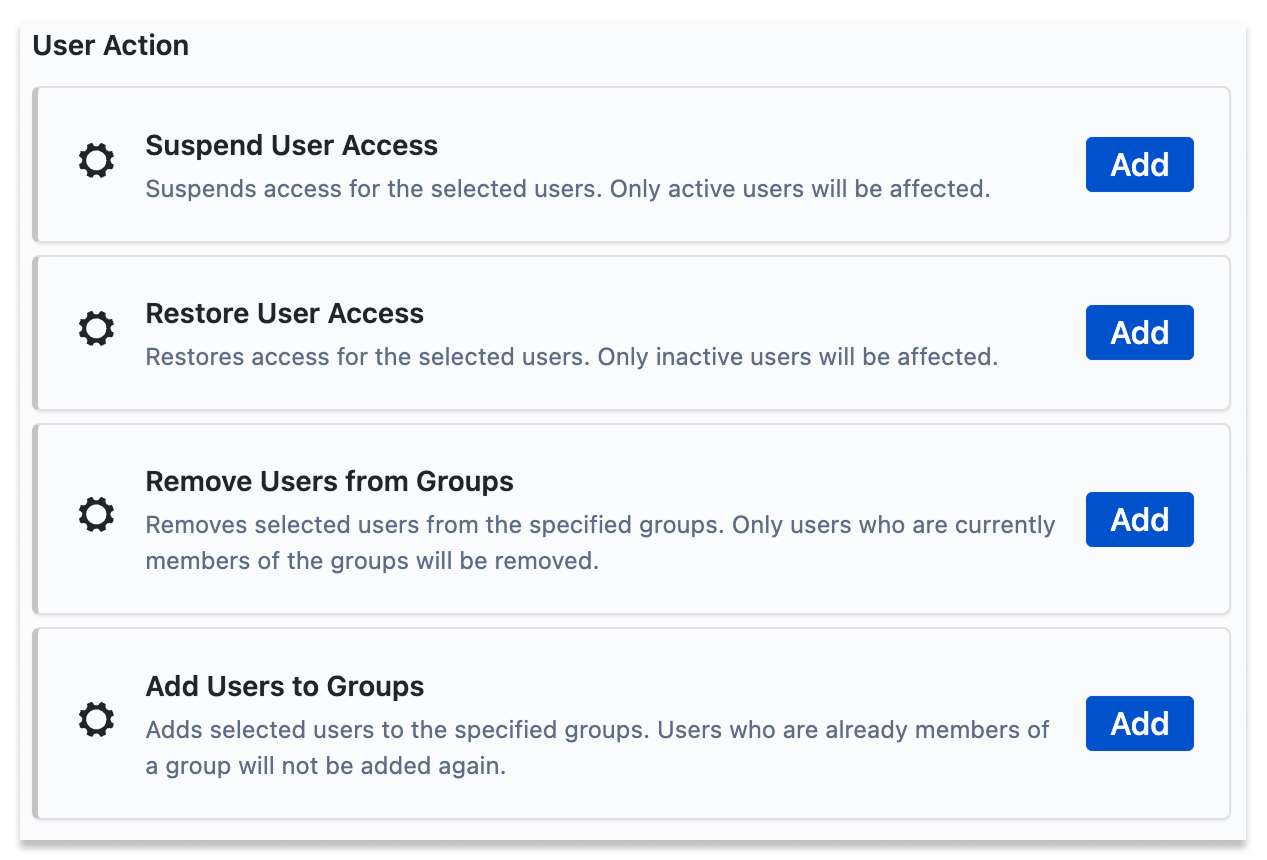
1. **Add user to Group**
   1. Commonly used to **grant** users access to a product, access to a project or space, or admin access groups.
2. **Remove user from Group**
   1. Commonly used to **remove** users access to a product, access to a project or space, or admin access groups.
3. **Suspend User Access**
   1. Completely **removes** all access for a user, but keeps their groups intact so they can easily be restored.
4. **Restore User Access**
   1. Allows a user to **access** all their previous products/projects/spaces, from being suspended.

<figure><img src="https://3637913942-files.gitbook.io/~/files/v0/b/gitbook-x-prod.appspot.com/o/spaces%2FohrITcpqnalkwz3hXr9a%2Fuploads%2FNtOjzeyVPond8e346taX%2FUser%20Action%20Components.png?alt=media&amp;token=f6088dd8-23d5-4a50-826f-62cd28de77ee" alt=""><figcaption><p>User Action Components</p></figcaption></figure>

### Coming Soon

1. Grant product roles and access
2. Remove product roles and access
3. Remove user from Organization
4. Activate managed user
5. Deactivate managed user
6. Delete managed user
7. Import Users and Groups
8. Export Users and Groups

Got a question? Check out our [FAQs](/features/faqs) or email us at <hello@smolsoftware.com>&#x20;


# Controlling Your Rules

Learn what actions you can take on your rules to control them

Users can alter existing rules through the actions menu, either from the Rule list or the Rule Details page:

**Reschedule** - When a rule is rescheduled, the schedule is changed and the next run date is set to the rescheduled date and time. The rule will **not** be run immediately, but the rule will be enabled if it was previously disabled.

**Run now** - When enabling a rule, it is immediately run. After completing the run successfully, the next run time will be set to whatever has been scheduled.

**Disable/Enable** - This stops the rule from being run in the future.

**Clone** - This copies the current open rule, and allows you to edit the Schedule and Components before saving it as a new rule.

**Delete** - This deletes the rule. The associated audit logs are not currently visible after the rule is deleted. Audit logs of deleted rules will be visible in a future [Audit Log](/features/audit-logs) function.

<img src="https://3637913942-files.gitbook.io/~/files/v0/b/gitbook-x-prod.appspot.com/o/spaces%2FohrITcpqnalkwz3hXr9a%2Fuploads%2Fl70izM48ZZXXkJDE1e93%2FControlingRules1.1.png?alt=media&amp;token=abda3148-9952-4e8b-b6a9-b7d420498a91" alt="" data-size="original">![](https://3637913942-files.gitbook.io/~/files/v0/b/gitbook-x-prod.appspot.com/o/spaces%2FohrITcpqnalkwz3hXr9a%2Fuploads%2FWIvj0GmIRux6E6zwxXgM%2FControlingRules1.2.png?alt=media\&token=a923754a-19c4-4978-abaf-59c0cc31928c)

Got a question? Check out our [FAQs](/features/faqs) or email us at <hello@smolsoftware.com>&#x20;


# Common Use Cases

Discover common uses for the Admin Automation rules and how to create them.

There are a number of common problems that our customers use the Admin Automation app to solve.

<details>

<summary>I want to add my SCIM users into the default Atlassian groups</summary>

Many Atlassian customers want to utilise the default Atlassian groups to simply their Jira project setup while using SCIM ([System for Cross-domain Identity Management](https://support.atlassian.com/provisioning-users/docs/understand-user-provisioning/)). When they create a new Jira project, they don't want to have to also change the Global, Product and Project settings to ensure the right users have access to the right projects.

The Admin Automation app allows customers to automatically add and remove users from any of the default Atlassian product access groups.

***

e.g. I want to add all users from Group X and Group Y into the default *jira-software-users* group

1. Create a new rule
2. Enter the rule name, description and schedule
3. Choose the "**Users from groups**" selection component
4. Select *Group X* and *Group Y* from the **Source groups** list
5. Choose the action component "**Add users to groups**"
6. Select *jira-software-users* from the **Target groups** list
7. Save the rule

Next, create a corresponding rule to remove users from the jira-software-users group when they're no longer in Group X or Group Y.

1. Create a new rule
2. Enter the rule name, description and schedule
3. Choose the "**Users from groups**" selection component
4. Select *jira-software-users* from the **Source groups** list
5. Add a filter component '**Exclude Group Members**' with the groups *Group X* and *Group Y*. This will leave you with users who have Jira Software access, but should be removed.
6. Choose the action component "**Remove users from groups**"
7. Select *jira-software-users* from the **Target groups** list
8. Save the rule

</details>

<details>

<summary>I want to SCIM sync my admins into the site-admin and org-admin groups</summary>

The site-admin and org-admin groups are 'protected' groups within the Atlassian products, and cannot be sync'd to with SCIM. The Admin Automation app allows customers to automatically add and remove users from the site-admin and org-admin groups, as well as any of the other administration groups in admin.atlassian.com.

Be careful to never allow the site-admin or org-admin groups to be empty. We recommend to only manually remove users from the org-admins group.

***

e.g. I want to add all users from *scim-admins* into the default *org-admins* group

1. Create a new rule
2. Enter the rule name, description and schedule
3. Choose the "**Users from groups**" selection component
4. Select *scim-admins* from the **Source groups** list
5. Choose the action component "**Add users to groups**"
6. Select *org-admins* from the **Target groups** list
7. Save the rule

</details>

<details>

<summary>I want to keep users with gmail.com emails (or any other email domain) out of my org</summary>

Having random users that are invited by other users, users that self-join or users that are manually added via a site or org admin, who are using public email addresses such as gmail.com, can put the security of your data at risk.

You can use the Select Users by Email Domain and corresponding filters to keep your data secure.

***

e.g. I want to suspend any user without a smolsoftware.com email address from my org

1. Create a new rule
2. Enter the rule name, description and schedule
3. Choose the "**Users by Email Domain**" selection component
4. Enter *gmail.com* into the **Exact email domains** field.
5. Choose the action component "**Suspend User Access**"
6. Save the rule

</details>

<details>

<summary>I want to suspend any users in my org who have any outside email addresses</summary>

Many Atlassian customers find that the 'User Access Settings' are hard to lock down; they want to completely remove any user that isn't from their company. This includes users that are invited by other users, users that self-join and users that are manually added via a site or org admin.

You can use the Select Users by Email Domain and corresponding filters to keep your data secure.

***

e.g. I want to suspend any user who does not have a smolsoftware.com email address in my org.

1. Create a new rule
2. Enter the rule name, description and schedule.
3. Choose the **Users by Email Domain** selection component
4. Enter "*."* into the **Domain contains** field. This will match all user email domains with a . (dot) in it, which will be every user in your org.
5. Add a filter component **Users by Email Domain**
6. Enter "*smolsoftware.com"* in the **Exact Email Domains** field and toggle **Exclude Mode** to on. This will leave you with users who are in your org, but who are not Smol Software staff.
7. Choose the action component **Suspend User Access**, to suspend all the non-smol software staff.
8. Save the rule

</details>

<details>

<summary>I want to enable temporary org admin access for some users via SCIM</summary>

If you’re using SCIM to sync your users to your Atlassian products, you can configure two rules to allow a Just In Time (JIT) provisioning process to occur for a majority of your org admins.

**Note: You should always have one or two users with permanent org admin permissions, to avoid breaking/loosing access to your org and needing Atlassian Support to get it back.**&#x20;

***

In your IdP (Identity Provider), create a new group called *temp-admins*, this is the group your users will be added to in your IdP to give them temporary org admin permissions. In your Atlassian User Directory, create a group called *permanent-org-admins* and add your one or two trusted users that will always have org admin permissions.

The two rules to create are:

1. Schedule a rule to run hourly, to add the temp and permanent admins to your Org Admin group. Add the following components:

   1. Choose the **Select Users from Groups** selection component and add the *temp-admins* and *permanent-org-admins* group.
   2. For the Action component, choose **Add Users to Groups** and choose the *org-admin* group.
   3. Save the rule.

   ![](https://3637913942-files.gitbook.io/~/files/v0/b/gitbook-x-prod.appspot.com/o/spaces%2FohrITcpqnalkwz3hXr9a%2Fuploads%2Fq8N2dgBfUZ3paVfJXaRP%2FUseCase-JIT1.1.png?alt=media\&token=38eac2bb-9628-40db-b221-c2f4188bf10c)![](https://3637913942-files.gitbook.io/~/files/v0/b/gitbook-x-prod.appspot.com/o/spaces%2FohrITcpqnalkwz3hXr9a%2Fuploads%2FzKt7lxDCoJFeNQfzodru%2FUseCase-JIT1.2.png?alt=media\&token=77b682a9-9f89-485e-ba50-ada7312889c3)<br>
2. Schedule a second rule to run hourly, to remove temp admins who should no longer have access. Add the following components:
   1. Choose the **Select Users from Groups** selection component, for the *org-admins* group.
   2. Add the **Exclude Group Members** filter component, for the *permanent-org-admins and temp-admins* group.
   3. For the Action component, choose **Remove Users to Groups** and choose the *org-admin* group.
   4. Save the rule. This will ensure that any user removed from the *temp-admins* group by your IdP are also removed from the org-admin group within the hour.

<div><figure><img src="https://3637913942-files.gitbook.io/~/files/v0/b/gitbook-x-prod.appspot.com/o/spaces%2FohrITcpqnalkwz3hXr9a%2Fuploads%2Ff0Mf8gtKucG8jbFKXvOk%2FUseCase-JIT2.1.png?alt=media&amp;token=410ea633-1761-4867-9d36-163667d04b2a" alt=""><figcaption></figcaption></figure> <figure><img src="https://3637913942-files.gitbook.io/~/files/v0/b/gitbook-x-prod.appspot.com/o/spaces%2FohrITcpqnalkwz3hXr9a%2Fuploads%2FFlowMTEA2q06GzNyRtHO%2FUseCase-JIT2.2.png?alt=media&amp;token=a341088f-70ce-4693-8cb0-61eaef125d44" alt=""><figcaption></figcaption></figure> <figure><img src="https://3637913942-files.gitbook.io/~/files/v0/b/gitbook-x-prod.appspot.com/o/spaces%2FohrITcpqnalkwz3hXr9a%2Fuploads%2FSrIY0o9jVXqjyoLQQIjn%2FUseCase-JIT2.3.png?alt=media&amp;token=471cd7ac-1dce-40c0-890b-d87ee6a17b64" alt=""><figcaption></figcaption></figure></div>

Then you just need to trigger a group change in your IdP to get what you need. That trigger could be as simple as a manual task after an approval process (such as via ServiceNow or Jira Service Management).

</details>

<details>

<summary>I want to copy 1000's of users from one group to another</summary>

Unfortunately, Atlassian admins don't have many options to perform bulk actions on users and groups. The Admin Automation app allows 'Run Once' rules to be run, to add or remove 1000's of users from one group to another, quickly and easily. After the rule has been run once, it will automatically disable itself and be available if you want to run it again in the future.

***

e.g. I want to copy all users from Group X into Group Y

1. Create a new rule
2. Enter the rule name, description, for the schedule make sure you select "**Run Once**".
3. Choose the "**Users from groups**" selection component
4. Select *Group X* from the **Source groups** list
5. Choose the action component "**Add users to groups**"
6. Select *Group Y* from the **Target groups** list
7. Save the rule

</details>

<details>

<summary>I want to prevent self invited users from getting access to Jira or Confluence</summary>

Many Atlassian customers find that the 'User Access Settings' are hard to lock down; they want to completely remove any user that isn't added via SCIM sync. This includes users that are invited by other users, users that self-join and users that are manually added via a site or org admin. There are two ways that the Admin Automation app can help with this:

* Customers can designate a 'key' SCIM group, and only users that exist in that group can be added to a default Atlassian product access group.\
  e.g. If a user *exists* in the **idp-jira-users** group, then add them to **jira-software-users** group. If a user *doesn't exist* in the **idp-jira-users** group, then remove them from the **jira-software-users** group

1. Create a new rule
2. Enter the rule name, description and schedule
3. Choose the "**Users from groups**" selection component
4. Select *idp-jira-users* from the **Source groups** list
5. Choose the action component "**Add users to groups**"
6. Select *jira-software-users* from the **Target groups** list
7. Save the rule

Next, create a corresponding rule to remove users from the jira-software-users group if they're not in the *idp-jira-users* group.

1. Create a new rule
2. Enter the rule name, description and schedule
3. Choose the "**Users from groups**" selection component
4. Select *jira-software-users* from the **Source groups** list
5. Add a filter component '**Exclude Group Members**' with the group *idp-jira-users*. This will leave you with users who have Jira Software access, but should be removed.
6. Choose the action component "**Remove users from groups**"
7. Select *jira-software-users* from the **Target groups** list
8. Save the rule

***

Alternatively:

* Customers can create an automation rule to remove users from the default Atlassian product access groups. **This ensures that the default groups are always empty** and anyone manually invited or added via another user will be removed automatically. This only works if there are alternative SCIM sync'd groups controlling access to the Atlassian products.

1. Create a new rule
2. Enter the rule name, description and schedule.
3. Choose the "**Users from groups**" selection component
4. Select a default Atlassian product access group, such as *jira-software-users* from the **Source groups** list
5. Choose the action component "**Remove users from groups**"
6. Select *jira-software-users* from the **Target groups** list
7. Save the rule

</details>

<details>

<summary>I don't want anyone to get access to Jira or Confluence via the default Atlassian groups</summary>

Many Atlassian customers find that it's difficult to lock down their Atlassian products. They want to completely remove any user that isn't added via SCIM sync. This includes users that are invited by other users, users that self-join and users that are manually added via a site or org admin.

Customers can create an automation rule to remove users from the default Atlassian product access groups. **This ensures that the default groups are always empty** and anyone manually invited or added via another user will be removed automatically. This only works if there are alternative SCIM sync'd groups controlling access to the Atlassian products.

***

1. Create a new rule
2. Enter the rule name, description and schedule.
3. Choose the "**Users from groups**" selection component
4. Select a default Atlassian product access group, such as *jira-software-users* from the **Source groups** list
5. Choose the action component "**Remove users from groups**"
6. Select *jira-software-users* from the **Target groups** list
7. Save the rule

</details>

<details>

<summary>I need to merge different groups</summary>

There are a few situations where customers want to merge different groups. The most common is related to having multiple SCIM groups, but not wanting to have to manually grant each of those groups product access:

1. Merging multiple SCIM groups into one, to give that one group Jira or Confluence user access.
2. Merging multiple 'Customer' SCIM groups into one, to give that one group the Customer Role in Jira Service Management.

There's also the use case where the Site Admin or Org Admin doesn't have control over the groups created in their IdP. They have too many groups with small numbers of users in them, and no way to control which groups are created in the IdP. Merging multiple SCIM groups makes managing product access much easier.

The Admin Automation app can be used to merge two or more groups into one.

</details>

Got a question? Check out our [FAQs](/features/faqs) or email us at <hello@smolsoftware.com>&#x20;


# Publishing Process

Learn about the automation publishing process

### Draft Automation Rules

Users can create draft automation rules which will run in a 'Test' or 'Draft' mode. Rules with this status will not be executed within your organization or user base. They will show you what would have happened, if the rule was published and run. This is useful for:

1. Testing that any **complex automations** run correctly, before publishing or running them live.
2. Testing any automations that **remove users access to products**. To avoid inadvertently removing access from the wrong users.
3. Creating a draft list of users that you can manually address. e.g. If automatically removing user access is too risky, creating a draft will list the users that meet your rule criteria, allowing you to manually remove them when you're ready.

If a draft rule is published, all draft results will be immediately cleared and the rule will be rerun at the next scheduled run time.

### Publish and Unpublish Automation Rules

Users can **Publish** draft automation rules, which will make them immediately active and they will run at the next scheduled time.

Pressing the **Unpublish** button will move an automation rule into a draft state. It will still run at the next scheduled time, but only in a draft state, not making any changes to your organization or user base. You can see the results of the draft automation in the 'Draft' tab, within the rule details.

Got a question? Check out our [FAQs](/features/faqs) or email us at <hello@smolsoftware.com>&#x20;


# Audit logs

Learn about the audit logs available

There are three types of audit logs available that will give admins different types of information:

<table data-view="cards"><thead><tr><th></th><th></th><th data-type="content-ref"></th></tr></thead><tbody><tr><td><strong>Admin Automation logs</strong> </td><td>Tracks automations that have run successfully or not</td><td><a href="/features/audit-logs#admin-automation-logs">Audit logs</a></td></tr><tr><td><strong>Atlassian Guard logs</strong></td><td>Available with the Atlassian Guard subscription</td><td><a href="/features/audit-logs#atlassian-access-logs">Audit logs</a></td></tr><tr><td><strong>Jira product logs</strong></td><td>Available with any Jira product subscription</td><td><a href="/features/audit-logs#jira-product-logs">Audit logs</a></td></tr></tbody></table>

### Admin Automation logs

These logs cover all the Admin Automation app activities, including:

1. Successful and failed executions of rules.
2. Changes that a successful rule execution has done to users or groups.

The audit logs are visible in the Rule details page, displaying:

* The **Run Dates** of each rule, and how long each rule took to run.
* The **Audit Log** for each rule run, showing which users had the rule action performed on them, when it was done and if it was successful or not.

<div><figure><img src="https://3637913942-files.gitbook.io/~/files/v0/b/gitbook-x-prod.appspot.com/o/spaces%2FohrITcpqnalkwz3hXr9a%2Fuploads%2F0a1W8WfyDxN4DDJSpuDy%2FAudit%20Log%20history.png?alt=media&amp;token=e3c219e7-4862-4024-af86-4275201b506b" alt=""><figcaption><p>History of when automations run</p></figcaption></figure> <figure><img src="https://3637913942-files.gitbook.io/~/files/v0/b/gitbook-x-prod.appspot.com/o/spaces%2FohrITcpqnalkwz3hXr9a%2Fuploads%2FC09gmdtvrRzhXJY291Zz%2FAudit%20logs%20of%20User%20Changes.png?alt=media&amp;token=cacbf1bc-5883-461a-a3d9-9fb2fddbdbc2" alt=""><figcaption><p>Logs of what the automation changed</p></figcaption></figure></div>

### Atlassian Guard logs

These logs cover all [admin.atlassian.com](https://admin.atlassian.com) activities, such as user invitations, product access, group changes and authentication policy changes. These logs are only available on a paid Atlassian Guard plan and are available for 180 days.

[Learn more about the Atlassian Guard logs](https://support.atlassian.com/organization-administration/docs/track-organization-activities-from-the-audit-log/).

### Jira product logs

Jira product logs can be accessed via the Jira Administration System settings. They cover a majority of user activities within Jira and will also include some [admin.atlassian.com](https://admin.atlassian.com) administration activities, such as adding and removing users and groups. These logs are only available on a paid Jira plan.

[Learn more about the Jira product logs](https://support.atlassian.com/jira-cloud-administration/docs/audit-activities-in-jira-applications/).

Got a question? Check out our [FAQs](/features/faqs) or email us at <hello@smolsoftware.com>&#x20;


# FAQs

Frequently asked questions

<details>

<summary>Q: How can I set up Admin Automation to sync my users via SCIM, to the default Atlassian product access groups?</summary>

A: You can use a combination of the **Add user to group** and **Remove user from group** actions, to ensure all users from any of your sync'd Identity Provider groups are added to and removed from the default Atlassian product access groups, such as  **jira-software-users**, **jira-servicemanagement-users** or **confluence-users**.

Read more in our [Common Use Cases](/features/overview#common-use-cases) section.

</details>

<details>

<summary>Q: Can I sync site admins and org admins via SCIM managed groups?</summary>

A: Yes! You can use a combination of the **Add user to group** and **Remove user from group** actions, to sync users from a SCIM group (such as **idp-site-admins**) to the **site-admin** group, or the **org-admin** group.

Read more in our [Common Use Cases](/features/overview#common-use-cases) section.

</details>

<details>

<summary>Q: Can I run bulk actions with this app?</summary>

A: Yes! You can make changes to thousands of users at once. There's even a special ['Run Once](/features/overview/schedule)' frequency, so you can manually choose when to run a bulk action rule. Like moving thousands of users from one group to another.

Read more in our [Common Use Cases](/features/overview#common-use-cases) section.

</details>

<details>

<summary>Q: Does this app work for Confluence and other products?</summary>

A: Yes! When you purchase the the Admin Automation app for your Jira product, it will work across all the products connected to your Atlassian organization.

There will be a Confluence specific version of the Admin Automation app released in the future, for customer that do not have a Jira product.

</details>

<details>

<summary>Q: What happens if my rule frequency is set to Hourly, but the rule takes longer than an hour to complete?</summary>

A: The second rule execution will not start until after the first rule has finished. So there's no risk of a rule interfering with itself. For rules that will affect large numbers of users, the first time that rule is run it could take a longer than normal time to complete. But subsequent executions (with smaller numbers of affected users) will be much faster.&#x20;

</details>

<details>

<summary>Q: Does every user of Admin Automation need their own API Key?</summary>

A: Yes. For added security, each user needs to supply a valid API key. Jira Admins, Site Admin and Organization admins are eligible users of the Admin Automation app, but each needs to supply a valid API Key when using the app for the first time. This means if a Jira Admin or Site Admin wants to use the app, they'll have to get an API Key off an Organization Admin.

The reason for this added security, is the Admin Automation app is a very powerful tool and can make many different changes to the Organization's users, groups and product access. We want to ensure that only users authorized by an Organization Admin can make those changes.

</details>

<details>

<summary>Q: When are you releasing X feature?</summary>

Check out our roadmap page for a rough idea of what we're working on right now and in the future. If you have a suggestion for a feature, you can let us know [here](https://smolsoftware.atlassian.net/servicedesk/customer/portal/1/group/1/create/8).

</details>

<details>

<summary>Q: Which regions is your data hosted in?</summary>

We're in the AWS regions US-West-2 and EU-West-2

</details>

Got a question that's not covered here? Email us at <hello@smolsoftware.com>&#x20;


# Roadmap

What is our team working on?

[Suggest a feature](https://smolsoftware.atlassian.net/servicedesk/customer/portal/1/group/1/create/8)

## In progress

What we're working on right now!

* [ ] Automation to remove inactive users

## Planned

What we're planning to work on soon!

* [ ] Activate/Deactivate managed user
* [ ] Delete managed users
* [ ] Grant/Remove explicit product roles
* [ ] User and Group importing/exporting
* [ ] Custom email notifications on successful or failed rule executions

## Released

What we've already built and released!

### March 2025

* [x] New and improved user interface
* [x] Cloning and editing of existing rules
* [x] [Additional filters for Groups](/features/overview/filters#group-membership-filter)
* [x] Email Domain [selection](/features/overview/selection) and [filters](/features/overview/filters#filter-users-by-email-domain)
* [x] Suspend site access for a user
* [x] Restore site access for a user
* [x] [Improved audit logs](/features/audit-logs)
* [x] [Draft rule creation and Test running](/features/publishing-process)

### September 2024

* [x] Security and bug fixes

### April 2024

* [x] User specified start times
* [x] Rescheduling rules
* [x] 'Run once' rule frequency
* [x] Audit log summary (last 5 rule executions)

### March 2024

* [x] Scheduled automations
* [x] Add user to group
* [x] Remove user from group

Got a question? Check out our [FAQs](/features/faqs) or email us at <hello@smolsoftware.com>&#x20;


# Security & Privacy

At Smol Software, we understand that protecting the privacy of your personal information is crucial. We take a multi-layered approach to security to ensure your information is protected at all times.

<table data-view="cards"><thead><tr><th></th><th></th><th></th><th data-hidden data-card-target data-type="content-ref"></th></tr></thead><tbody><tr><td><strong>Privacy Policy</strong></td><td>We take your privacy seriously. We are committed to upholding your privacy and adhering to the stringent standards set by Atlassian for the protection of personal data.​</td><td></td><td><a href="/legal/security-and-privacy/privacy-policy">Privacy Policy</a></td></tr><tr><td><strong>Security Practices</strong></td><td>Security and privacy are integral to our products, infrastructure, and processes. Ensuring your data is always safeguarded. Jira data remains on your site and never leaves it.​​</td><td></td><td><a href="/legal/security-and-privacy/security-practices">Security Practices</a></td></tr><tr><td><strong>SLA</strong></td><td>Our mission is to help teams provide legendary customer communications, and that's the standard we are holding ourselves to as well.​</td><td></td><td><a href="/legal/security-and-privacy/service-level-agreement">Service Level Agreement</a></td></tr></tbody></table>


# Privacy Policy

We are committed to upholding your privacy and adhering to the stringent standards set by Atlassian for the protection of personal data.

## 1. Acknowledgment <a href="#id-1.-acknowledgment" id="id-1.-acknowledgment"></a>

By using our Products, you acknowledge that you have reviewed our [Terms of Service](/legal/terms-of-service) and this Privacy Policy (**Privacy Policy**), have the authority to act on behalf of any person for whom you are using the Products, and agree that we may collect, use and transfer your Data in accordance with this Privacy Policy. If you are using our Products on behalf of a company, then you acknowledge that you are binding your company to this Privacy Policy.

This Privacy Policy applies to our Customers. It is the responsibility of the Customer to determine if the Privacy Policy is consistent with its own treatment of end user data.

## 2. Definitions <a href="#id-2.-definitions" id="id-2.-definitions"></a>

1. **Company** means Smol Software Pty Limited ABN 27 673 377 289. The terms “**we**”, “**we**” and “**we**” when used in his Privacy Policy are a reference to the Company.
2. **Customer** means a direct customer of the Company. The terms “**you**”, “**your**” and “ **yours**” when used in this Privacy Policy are a reference to the Customer.
3. **Data** means Personal Information and User Data.
4. **Data Controller** has the meaning given in Rec. 22, Art 3(1) of the GPDR, that is, a natural or legal person, public authority, agency or any other body which alone or jointly with others determines the purposes and means of the processing of Personal Information, where the purposes and means of processing are determined by EU or Member State laws.
5. **Data Subject** means an identified or identifiable natural person who is a user of our Product.
6. **GDPR** means the European Union General Data Protection Regulation.
7. **Law** means all relevant legal and regulatory requirements applicable to you or us (including, for the avoidance of doubt, the Australian Privacy Act 1988 (Cth) and the GDPR).
8. **Personal Information** means information or an opinion about an identified individual, or an individual who is reasonably identifiable, whether the information or opinion is true or not and whether the information or opinion is recorded in a material form or not.
9. **Product** means software owned, developed and sold by us.
10. **Subprocessor** means any processor engaged by us or by any other Subprocessor who agrees to receive from us or from any other Subprocessor, Personal Information exclusively intended for processing activities to be carried out on behalf of you after the transfer in accordance with your instructions, our [Terms of Service](/legal/terms-of-service) and this Privacy Policy.
11. **Supervisory Authority** means the authority with the primary responsibility for dealing with the relevant data processing activity.
12. **Unsolicited Information** includes any unsolicited communications by you to the Company.
13. **User Data** means all information collected passively or actively from our Customers that is not Personal Information

## 3. Collection and use <a href="#id-3.-collection-and-use" id="id-3.-collection-and-use"></a>

1. We process the Data provided by you in accordance with the Privacy Policy and your instructions. We will promptly inform you if we cannot process your Data in accordance with the Privacy Policy.
2. The processing activities that we undertake include
   1. email notifications of new software versions to contacts;
   2. analysis of Product analytics to understand usage patterns;
3. You agree that we may collect and use technical data and related information, including without limitation, technical information relating to your device, system, and use of the Product(s), that is gathered periodically to facilitate the provision of software updates, product support, marketing efforts and other services and communications to you related to the Products, including providing you with information about services, features, surveys, newsletters, offers, promotions; providing other news or information about us and our select partners; and sending you technical notices, updates, security alerts, and support and administrative messages. We may use this technical data and related information, as long as it is in a form that does not personally identify you, except to the extent necessary to provide you with support, or communications to improve our products or to provide services or technology to you.

## 4. Security measures <a href="#id-4.-security-measures" id="id-4.-security-measures"></a>

1. We have implemented the following security measures:
   1. Two Factor Authentication to access all development and production services;
   2. Use of a password manager, ensuring a unique password is used for each development and production service;
2. We use a self-assessment approach to ensure compliance with the Privacy Policy. We verify periodically that the Privacy Policy is accurate and comprehensive for the information intended to be covered, prominently displayed, completely implemented, and accessible and in conformity with applicable Laws. We encourage interested parties to contact us with any concerns using the contact information provided.
3. We will:
   1. restrict access and use of Data to those employees responsible for processing Data to fulfil our obligations under the Privacy Policy; and
   2. maintain a list of our employees that have been granted access to Data.

## 5. Incident response <a href="#id-5.-incident-response" id="id-5.-incident-response"></a>

Where there has been a security breach, data leakage or Personal Information is lost, destroyed or becomes damaged, corrupted or unusable, we will notify you as soon as practicable.

## 6. Your obligations <a href="#id-6.-your-obligations" id="id-6.-your-obligations"></a>

You agree and warrant that:

1. the processing, including the transfer itself, of Personal Information has been and will continue to be, carried out in accordance with all applicable Laws (and, where applicable, you have notified the Supervisory Authority in your country of such processing);
2. all Data that you provide on behalf of a Data Subject has been obtained with the informed consent of the Data Subject;
3. you have assessed our security measures as described in clause 4 and believe our security measures ensure a level of security appropriate to the nature of the Data you provide to us;
4. you will provide Data Subjects with a copy of the Privacy Policy or a description of our security measures, if requested by the Data Subject;
5. if applicable, you will deposit a copy of the Privacy Policy with the Supervisory Authority upon request or if such deposit is required under the applicable Laws.

## 7. Access to Data <a href="#id-7.-access-to-data" id="id-7.-access-to-data"></a>

1. Data Subjects have the right to request that we update, correct or, upon request, erase Personal Information in our possession. We will endeavour to provide the requested Personal Information within a reasonable time.
2. If you request a correction to your Personal Information then we will take reasonable steps to correct that Personal Information.
3. To guard against fraudulent requests, we will require information to confirm your identity before granting access or making corrections.
4. We may decline to provide a Data Subject with access to Personal Information including where we determine that the information requested:
   1. may disclose:
      1. the Personal Information of another individual; or
      2. trade secrets or other business confidential information;
   2. is subject to legal professional privilege;
   3. is not readily retrievable and the burden or cost of providing the information would be disproportionate to the nature or value of the information;
   4. does not exist, is not held, or cannot be located by us;
   5. would pose a serious threat to the life, health or safety of any individual, or to public health or safety if it were accessed; or
   6. is not permitted by Law to be accessed.

## 8. Subprocessing <a href="#id-8.-subprocessing" id="id-8.-subprocessing"></a>

1. We will not disclose your Data to any other party other than at your request or in accordance with this clause.
2. We will share information including Personal Information with our Subprocessors. In addition, Atlassian works with us on certain business-related functions of our Products, such as processing payments. Atlassian has its own privacy policy, which you can find under <https://www.atlassian.com/legal/privacy-policy>.
3. There are also a limited number of circumstances in which we may share your Data with third parties. This may be done without further notice to you. These circumstances are:
   1. Legal requirements: We may disclose your Data and any other information if required to do so by law or in good faith belief that such action is necessary to:
      1. comply with a legal obligation;
      2. protect and defend the rights or property of the Company; or
      3. protect against legal liability.
   2. Business transfers and related activities: We may sell, buy, restructure or reorganise our business or assets. In the event of any sale, merger, reorganisation, restructuring, dissolution or similar event involving our business or assets, Personal Information may be part of the transferred assets.

## 9. Cross-border transfer of data <a href="#id-10.-cross-border-transfer-of-data" id="id-10.-cross-border-transfer-of-data"></a>

1. If you are using our Products in a country other than the United States, your communications will result in the transfer of Data across international boundaries. The countries in which recipients of your Personal Information are likely to be located are the United States, Australia and countries within the European Union.
2. If you provide Personal Information, you acknowledge and agree that Personal Information may be transferred from your current location to the offices and servers of the Company and Subprocessors located primarily in Australia, the United States and countries within the European Union.

## 10. Warranties <a href="#id-11.-warranties" id="id-11.-warranties"></a>

We warrant that:

1. you may withdraw your consent for us to process your Data at any time at which time the process under clause 12 will be followed;
2. we will process your Data in compliance with your instructions and the Privacy Policy. If we cannot provide such compliance for whatever reason, we will inform you promptly of our inability to comply, in which case you are entitled to suspend the transfer of Data and/or terminate your contract with us;
3. we will not vary or modify clauses of the Privacy Policy without notifying you and obtaining your consent;
4. we have no reason to believe that any Law prevents us from fulfilling the terms of the Privacy Policy. In the event of a change in the Law that is likely to have a substantial adverse effect on the warranties and obligations provided under the Privacy Policy, we will promptly notify you of the change as soon as we become aware, in which case you are entitled to suspend the transfer of Data and/or terminate your contract us;
5. we will implement and maintain appropriate technical and organisation measures to meet the requirements of the Australian Privacy Act 1988 (Cth) and the GDPR. This does not alter your own obligations under these legal regimes;
6. we will only use your Data for the purposes for which it is provided by you;
7. we will not sell or otherwise redistribute to third parties the Data we collect from you;
8. we will promptly notify you of:
   1. any legally binding request for disclosure of the Data by a law enforcement authority unless otherwise prohibited, such as a prohibition under criminal law to preserve the confidentiality of a law enforcement investigation;
   2. any unauthorised access to or disclosure of Personal Information or any circumstances that are likely to give rise to such unauthorised access or disclosure, where there is a likely risk of serious harm to any Data Subject as a result of the unauthorised access or disclosure; and
   3. any request received directly from one of your customers or a Data Subject, without responding to that request, unless we have been otherwise authorised by you to do so;
9. we will deal promptly and properly with all inquiries from you relating to the processing of your Data and we will abide by the advice of any Supervisory Authority with regard to the processing of the Data transferred; and
10. the processing services by any Subprocessor will be carried out in accordance with clause 19.

## 11. Survival <a href="#id-12.-survival" id="id-12.-survival"></a>

The Privacy Policy will survive termination of the Terms of Service and will remain in effect until we have deleted all of your Data.

## 12. Termination <a href="#id-13.-termination" id="id-13.-termination"></a>

On termination, you will have the choice of having all Data transferred to you or the Data being destroyed, unless Laws imposed on us prevent us from returning or destroying all or part of the Data. If we cannot return or destroy the Data, we warrant that we will guarantee the confidentiality of the Data and will not actively process the Data after termination.

## 13. Audit of measures <a href="#id-14.-audit-of-measures" id="id-14.-audit-of-measures"></a>

1. Where you are required by a Supervisory Authority to demonstrate compliance with privacy obligations, we allow and contribute to audits, including inspections.
2. We will submit our data processing facilities for an audit of the measures referred to in clause 13(1) at the request of you and/or the Supervisory Authority.

## 14. Unsolicited information <a href="#id-15.-unsolicited-information" id="id-15.-unsolicited-information"></a>

1. If you submit unsolicited User Data, we will use it in accordance with the Privacy Policy.
2. If you submit unsolicited Personal Information and we determine that we could not have collected the Personal Information in accordance with the Privacy Policy, we will destroy the information or ensure that the information is de-identified as soon as practicable. Otherwise, the Personal Information will be used in accordance with the Privacy Policy.

## 15. European Union General Data Protection Regulation <a href="#id-16.-european-union-general-data-protection-regulation" id="id-16.-european-union-general-data-protection-regulation"></a>

1. Clauses 16 to 20 apply only if you are a Data Controller.
2. If you are a Data Controller, clause 21 will not apply and instead the Privacy Policy will be governed by the law of the country in which you reside or are incorporated.

## 16. Notifying the data protection authority <a href="#id-17.-notifying-the-data-protection-authority" id="id-17.-notifying-the-data-protection-authority"></a>

In the event that you receive a notification from us or any Subprocessor under clause 10(4) or 13(3), you must forward such notification to the Supervisory Authority if you decide to continue the transfer of Personal Information or to lift the suspension.

## 17. Liability <a href="#id-18.-liability" id="id-18.-liability"></a>

1. Any Data Subject who has suffered damage as a result of any breach of the obligations referred to in clause 19 by us, a Subprocessor or yourself, is entitled to receive compensation from you for the damage suffered.
2. Where either the Company or a Subprocessor has breached the obligations referred to in clause 19 and a Data Subject is unable to bring a claim for compensation in accordance with clause 19(1) because you have disappeared, ceased to exist in Law, or have become insolvent, the Data Subject may issue a claim against us, unless any successor entity has assumed your entire legal obligations by contract or by operation of law, in which case the Data Subject can enforce its rights against the successor entity.

## 18. Mediation and jurisdiction <a href="#id-19.-mediation-and-jurisdiction" id="id-19.-mediation-and-jurisdiction"></a>

1. If the Data Subject invokes third-party beneficiary rights and/or claims compensation for damages under the Privacy Policy, we will accept the decision of the Data Subject to:
   1. refer the dispute to mediation, by an independent person or, where applicable, by the Supervisory Authority; or
   2. refer the dispute to the courts in your country.
2. The choice made by the Data Subject will not prejudice their substantive or procedural rights to seek remedies in accordance with other provisions of Law.

## 19. GDPR-compliant subprocessing <a href="#id-20.-gdpr-compliant-subprocessing" id="id-20.-gdpr-compliant-subprocessing"></a>

1. In addition to our obligations under clause 8, we will not subcontract any of our processing operations performed on your behalf without your prior written consent.
2. Where a Subprocessor is engaged to process your Data in accordance with clause 19(1), we will enter into a written agreement with the Subprocessor. A copy of this written agreement will be provided to you. Where the Subprocessor fails to fulfil its data protection obligations under the written agreement, we will remain fully liable to you for the performance of the Subprocessor’s obligations under such agreement.
3. The prior written agreement between the Company and the Subprocessor will provide for:
   1. the imposition of the same obligations on the Subprocessor as are imposed on us under the Privacy Policy, as applicable;
   2. if a Data Subject is not able to bring a claim against you or us as referred to in clause 17, arising out of a breach by the Subprocessor of any of its obligations referred to in the Privacy Policy because both you and the Company have disappeared, ceased to exist in Law or become insolvent, the Data Subject may issue a claim against the Subprocessor (unless any successor entity has assumed all of your or our legal obligations by contract or by operation of law as a result of which it takes on your or our rights and obligations in which case the Data Subject can enforce its rights against such entity). The liability of the Subprocessor will be limited to its own processing operations under the Privacy Policy;
   3. the Supervisory Authority’s right to conduct an audit of the Subprocessor; and
   4. the Subprocessor’s warranty that upon the request of you and/or the Supervisory Authority, it will submit its data processing facilities for an audit of the measures referred to in clause 13(1).

## 20. Your obligations under GDPR <a href="#id-21.-your-obligations-under-gdpr" id="id-21.-your-obligations-under-gdpr"></a>

As a condition of our provision of the Products to you, you agree to comply with all of your obligations under the GDPR.

## 21. Jurisdiction <a href="#id-22.-jurisdiction" id="id-22.-jurisdiction"></a>

Other than in accordance with clause 15(2), the Privacy Policy is governed by and construed in accordance with the laws of the State of New South Wales, Australia. You agree to submit any dispute arising out of your use of the Products to the exclusive jurisdiction of the State of New South Wales.

## 22. Making a complaint <a href="#id-23.-making-a-complaint" id="id-23.-making-a-complaint"></a>

You are entitled to lodge a complaint about our treatment of your Data with the relevant Supervisory Authority.

Before lodging a complaint with a Supervisory Authority, we encourage you to first attempt to resolve the complaint by contacting us using the details below. We will respond to your complaint within 30 days.

## 23. Changes to this Privacy Policy <a href="#id-24.-changes-to-this-privacy-policy" id="id-24.-changes-to-this-privacy-policy"></a>

We may update Our Privacy Policy from time to time. We will notify you of any changes by posting the new Privacy Policy on this page.

We will let you know via email and/or a prominent notice on Our Service, prior to the change becoming effective and update the "Last updated" date at the top of this Privacy Policy.

You are advised to review this Privacy Policy periodically for any changes. Changes to this Privacy Policy are effective when they are posted on this page.


# Security Practices

Security and privacy are integral to our products, infrastructure, and processes, ensuring your data is always safeguarded. Jira data remains on your site and never leaves it.

## API Keys and User Data <a href="#accessing-jira-data" id="accessing-jira-data"></a>

Admin Automation enables Atlassian admins to automate their user management tasks within [admin.atlassian.com](https://admin.atlassian.com). To do so, Admin Automation, uses the Atlassian Cloud Organization REST APIs directly or through gateway services operated by Smol Software. The Atlassian Cloud Organization  REST APIs require an API Key to function. This API Key, once provided to the Admin Automation app, is encrypted (256bit) and stored in a database in the us-west-2 or eu-west-1 regions of AWS.

## Backup and access to API Keys <a href="#storage-and-access-to-release-notes" id="storage-and-access-to-release-notes"></a>

Backup copies of data (including API Keys and automation rules) are taken daily and stored in the us-west-2 or eu-west-2 regions of AWS for up to 30 days.

API Keys are encrypted (256bit) and are not accessible by any employees.

## Infrastructure Access <a href="#infrastructure-access" id="infrastructure-access"></a>

The Smol Software team does not require access to production infrastructure as build, test, and deployment processes are automated. This helps ensure the security and protection of sensitive information and reduces the risk of security breaches.

## Identity and Access Management <a href="#identity-and-access-management" id="identity-and-access-management"></a>

Smol Software leverages a Cloud identity provider and a Cloud access management platform to manage access to infrastructure and services. A strict password policy is enforced for team members, and all privileged level infrastructure and service provider access require 2FA tokens for an added layer of security.

## Security vulnerabilities management <a href="#security-vulnerabilities-management" id="security-vulnerabilities-management"></a>

We commit to the Accelerated Resolution Timeframes of [Atlassian's security bugfix policy](https://www.atlassian.com/trust/security/bug-fix-policy) and to our [Service level agreement](https://docs.released.so/legal/service-level-agreement).


# Service Level Agreement

Our passion is crafting beautiful software that really helps you get your job done. Our customers are important to us and our goal is that you are happy with our products and all interactions with us.

## Response times <a href="#response-times" id="response-times"></a>

When you request support for Admin Automation we will respond on business days within 24 hours from the time of your request. We will do our best to get back to you much sooner, but we are a small company, so we appreciate your patience.

## Business hours <a href="#business-hours" id="business-hours"></a>

Our business hours are Monday to Friday from 9:00h to 17:00h (5:00pm) in the [AET timezone](https://www.timeanddate.com/time/zones/aet) . We are closed on [major holidays](https://www.nsw.gov.au/living-in-nsw/public-holidays) in New South Wales, Australia.

## Support channels <a href="#support-channels" id="support-channels"></a>

You may request support via the following channels.

* [Smol Software help desk](https://smolsoftware.atlassian.net/servicedesk/customer/portals)
* [Atlassian Community](https://community.atlassian.com/) Requests made through open forums such as the Atlassian Community are monitored and responded to only on a best-effort basis

## Support includes <a href="#support-includes" id="support-includes"></a>

* Help installing and configuring Admin Automation
* Help troubleshooting problems with Admin Automation
* Help identifying workarounds
* Support is provided in English

## Support does not include <a href="#support-does-not-include" id="support-does-not-include"></a>

* Phone support
* Product training
* Support to customers who don’t hold a valid and current licence or active subscription
* Support related to apps other than Admin Automation
* Support for Jira or admin.atlassian.com problems or help with configuring admin.atlassian.com in a way that’s unrelated to the use of Admin Automation
* Support in any language other than English
* Support to customers on a free plan will be limited to a reasonable amount and frequency


# Data sub-processors

Smol Software uses the third party entities below (each, a “sub-processor”) to process end-user data (i) on behalf of Smol Software customers and in accordance with contract terms between Smol Software and the sub-processor to uphold Smol Software's commitments in [Data Processing](https://docs.released.so/legal/data-processing-addendum).

| Subprocessor          | Description                                                                                                                                                                                                                                                                     | Privacy Statement                                |
| --------------------- | ------------------------------------------------------------------------------------------------------------------------------------------------------------------------------------------------------------------------------------------------------------------------------- | ------------------------------------------------ |
| Atlassian Corporation | We use Jira Service Management from Atlassian for the creation, tracking and administration of support tickets, Jira Software Cloud for tracking software development and task management, and Atlassian Confluence Cloud for the internal documentation of customer use cases. | <https://www.atlassian.com/legal/privacy-policy> |
| AWS                   | We use Amazon Web Services to store and process our customer's automations (S3 / RDS / AppRunner).                                                                                                                                                                              | <https://aws.amazon.com/privacy/>                |
| Google Workspace      | Email, Docs, Sheets, Slides, Forms.                                                                                                                                                                                                                                             | <https://policies.google.com/privacy>            |


# Terms of Service

These Terms govern:

* the use of Admin Automation, and,
* any other related Agreement or legal relationship with the Owner

in a legally binding way. Capitalised words are defined in the relevant dedicated section of this document.

The User must read this document carefully.

Nothing in these Terms creates any relationship of employment, agency, or partnership between the involved parties.

Admin Automation is provided by:

> Smol Software Pty Ltd, 10 Soldiers Ave, Freshwater NSW 2096, Australia
>
> ABN 27 673 377 289

Owner contact email: <hello@smolsoftware.com>

“Admin Automation” refers to

* this website, including its subdomains and any other website through which the Owner makes its Service available;
* the Service;
* any applications, sample and content files, source code, scripts, instruction sets or software included as part of the Service, as well as any related documentation;

The following documents are incorporated by reference into these Terms:

* Publicity rights. We may identify you as an Admin Automation customer in our promotional materials. We will promptly stop doing so upon your request sent to <hello@smolsoftware.com>.
* Commercial agent Atlassian. You acknowledge and agree that Atlassian is Admin Automation's commercial agent and that you are required to make any related payments or notifications of non-renewal of a subscription directly to Atlassian through the means Atlassian designates. Cancelling your subscription prior to expiration of the current subscription term, with either a monthly subscription basis or an annual subscription basis, means that you will not be charged for the next billing cycle, but you will not receive any refunds or credits for amounts that have already been charged.
* Atlassian Marketplace Terms of Use (<https://www.atlassian.com/licensing/marketplace/termsofuse>)
* Admin Automation for Jira Cloud: Atlassian Cloud Terms of Service (<https://www.atlassian.com/legal/cloud-terms-of-service>)
* [Privacy Policy](/legal/security-and-privacy/privacy-policy) of Smol Software, [Security practices](/legal/security-and-privacy/security-practices) statement of Smol Software.

## What the User should know at a glance <a href="#what-the-user-should-know-at-a-glance" id="what-the-user-should-know-at-a-glance"></a>

Please note that some provisions in these Terms may only apply to certain categories of Users. In particular, certain provisions may only apply to Consumers or to those Users that do not qualify as Consumers. Such limitations are always explicitly mentioned within each affected clause. In the absence of any such mention, clauses apply to all Users.

## Terms of Use <a href="#terms-of-use" id="terms-of-use"></a>

Unless otherwise specified, the terms of use detailed in this section apply generally when using Admin Automation.

Single or additional conditions of use or access may apply in specific scenarios and in such cases are additionally indicated within this document.

By using Admin Automation, Users confirm to meet the following requirements:

* There are no restrictions for Users in terms of being Consumers or Business Users;
* Users aren’t located in a country that is subject to a U.S. Government embargo, or that has been designated by the U.S. Government as a “terrorist-supporting” country;
* Users aren’t listed on any U.S. Government list of prohibited or restricted parties;

### **Content on Admin Automation**

Unless otherwise specified or clearly recognizable, all content available on Admin Automation is owned or provided by the Owner or its licensors.

The Owner undertakes its utmost effort to ensure that the content provided on Admin Automation infringes no applicable legal provisions or third-party rights. However, it may not always be possible to achieve such a result.

In such cases, without prejudice to any legal prerogatives of Users to enforce their rights, Users are kindly asked to preferably report related complaints using the contact details provided in this document.

Rights regarding content on Admin Automation - All rights reserved The Owner holds and reserves all intellectual property rights for any such content.

Users may not therefore use such content in any way that is not necessary or implicit in the proper use of the Service.

In particular, but without limitation, Users may not copy, download, share (beyond the limits set forth below), modify, translate, transform, publish, transmit, sell, sublicense, edit, transfer/assign to third parties or create derivative works from the content available on Admin Automation, nor allow any third party to do so through the User or their device, even without the User’s knowledge.

Where explicitly stated on Admin Automation, the User may download, copy and/or share some content available through Admin Automation for its sole personal and non-commercial use and provided that the copyright attributions and all the other attributions requested by the Owner are correctly implemented.

Any applicable statutory limitation or exception to copyright shall stay unaffected.

### **Access to external resources**

Through Admin Automation Users may have access to external resources provided by third parties. Users acknowledge and accept that the Owner has no control over such resources and is therefore not responsible for their content and availability.

Conditions applicable to any resources provided by third parties, including those applicable to any possible grant of rights in content, result from each such third parties’ terms and conditions or, in the absence of those, applicable statutory law.

### **Acceptable use**

Admin Automation and the Service may only be used within the scope of what they are provided for, under these Terms and applicable law.

Users are solely responsible for making sure that their use of Admin Automation and/or the Service violates no applicable law, regulations or third-party rights.

Therefore, the Owner reserves the right to take any appropriate measure to protect its legitimate interests including by denying Users access to Admin Automation or the Service, terminating contracts, reporting any misconduct performed through Admin Automation or the Service to the competent authorities – such as judicial or administrative authorities - whenever Users engage or are suspected to engage in any of the following activities:

* violate laws, regulations and/or these Terms;
* infringe any third-party rights;
* considerably impair the Owner’s legitimate interests;
* offend the Owner or any third party.
* using the Services to develop or improve competing products or services.

### **Software license**

Any intellectual or industrial property rights, and any other exclusive rights on software or technical applications embedded in or related to Admin Automation are held by the Owner and/or its licensors.

Subject to Users’ compliance with and notwithstanding any divergent provision of these Terms, the Owner merely grants Users a revocable, non-exclusive, non-sublicensable and non-transferable license to use the software and/or any other technical means embedded in the Service within the scope and for the purposes of Admin Automation and the Service offered.

This license does not grant Users any rights to access, usage or disclosure of the original source code. All techniques, algorithms, and procedures contained in the software and any documentation thereto related is the Owner’s or its licensors’ sole property.

All rights and license grants to Users shall immediately terminate upon any termination or expiration of the Agreement.

## Terms and Conditions of Sale <a href="#terms-and-conditions-of-sale" id="terms-and-conditions-of-sale"></a>

### **Paid Products**

Some of the Products provided by Smol Software, as part of the Service, are provided on the basis of payment.

The fees, duration and conditions applicable to the purchase of such Products are described below and in other dedicated sections.

### **Product description**

Prices, descriptions or availability of Products are outlined in the respective sections of Smol Software and are subject to change without notice.

While Products on Smol Software are presented with the greatest accuracy technically possible, representation on Smol Software through any means (including, as the case may be, graphic material, images, colors, sounds) is for reference only and implies no warranty as to the characteristics of the purchased Product.

The characteristics of the chosen Product will be outlined during the purchasing process.

### **Purchasing process**

Any steps taken from choosing a Product to order submission form part of the purchasing process.

The purchasing process includes these steps:

* Users must choose the desired Product and verify their purchase selection.
* After having reviewed the information displayed in the purchase selection, Users may place the order by submitting it.

All notifications related to the described purchasing process shall be sent to the email address provided by the User for such purposes.

### **Methods of payment**

Information related to accepted payment methods are made available during the purchasing process.

Some payment methods may only be available subject to additional conditions or fees. In such cases related information can be found in the dedicated section of Smol Software.

All payments are independently processed through third-party services. Therefore, Smol Software does not collect any payment information – such as credit card details – but only receives a notification once the payment has been successfully completed.

If a payment through the available methods fails or is refused by the payment service provider, the Owner shall be under no obligation to fulfil the purchase order. Any possible costs or fees resulting from the failed or refused payment shall be borne by the User.

### **Retention of usage rights**

Users do not acquire any rights to use the purchased Product until the total purchase price is received by the Owner.

### **Delivery**

**Performance of services** The purchased service shall be performed or made available within the timeframe specified from Smol Software or as communicated before the order submission.

### **Contract duration**

**Subscriptions** Subscriptions allow Users to receive a Product continuously or regularly over time. Details regarding the type of subscription and termination are outlined below.

## Liability and indemnification <a href="#liability-and-indemnification" id="liability-and-indemnification"></a>

### **EU Users**

#### **Indemnification**

The User agrees to indemnify and hold the Owner and its subsidiaries, affiliates, officers, directors, agents, co-branders, partners and employees harmless from and against any claim or demand ⁠— including but not limited to lawyer’s fees and costs ⁠— made by any third party due to or in relation with any culpable use of or connection to the Service, violation of these Terms, infringement of any third-party rights or statutory provision by the User or its affiliates, officers, directors, agents, co-branders, partners and employees to the extent allowed by applicable law.

#### **Limitation of liability**

Unless otherwise explicitly stated and without prejudice to applicable statutory product liability provisions, Users shall have no right to claim damages against the Owner (or any natural or legal person acting on its behalf).

This does not apply to damages to life, health or physical integrity, damages resulting from the breach of an essential contractual obligation such as any obligation strictly necessary to achieve the purpose of the contract, and/or damages resulting from intent or gross negligence, as long as Admin Automation has been appropriately and correctly used by the User.

Unless damages have been caused by way of intent or gross negligence, or they affect life, health or physical integrity, the Owner shall only be liable to the extent of typical and foreseeable damages at the moment the contract was entered into.

In particular, within the limits stated above, the Owner shall not be liable for:

* any loss of business opportunities and any other loss, even indirect, that may be incurred by the User (such as, but not limited to, trading losses, loss of revenue, income, profits or anticipated savings, loss of contracts or business relationships, loss of reputation or goodwill, etc.);
* damages or losses resulting from interruptions or malfunctions of Admin Automation due to acts of force majeure, or unforeseen and unforeseeable events and, in any case, independent of the will and beyond the control of the Owner, such as, but not limited to, failures or disruptions of telephone or electrical lines, the Internet and / or other means of transmission, unavailability of websites, strikes, natural disasters, viruses and cyber attacks, interruptions in the delivery of products, third-party services or applications;
* any losses that are not the direct consequence of a breach of the Terms by the Owner;
* any damage, prejudice or loss occurring due to viruses or other malware contained in or connected to files available for download from the internet or via Admin Automation. Users are responsible for implementing sufficient security measures – such as anti-viruses and firewalls to prevent any such infection or attack.

Notwithstanding the above, the following limitation applies to all Users not qualifying as Consumers:

In any event of liability, the compensation may not exceed the total payments that have been, will be or would be received by the Owner from the User based on the contract over a period of 12 months, or the period of the duration of the Agreement, if shorter.

### **Australian Users**

#### **Limitation of liability**

Nothing in these Terms excludes, restricts or modifies any guarantee, condition, warranty, right or remedy which the User may have under the Competition and Consumer Act 2010 (Cth) or any similar State and Territory legislation and which cannot be excluded, restricted or modified (non-excludable right). To the fullest extent permitted by law, our liability to the User, including liability for a breach of a non-excludable right and liability which is not otherwise excluded under these Terms of Use, is limited, at the Owner’s sole discretion, to the re-performance of the services or the payment of the cost of having the services supplied again.

### **US Users**

#### **Disclaimer of Warranties**

Admin Automation is provided strictly on an “as is” and “as available” basis. Use of the Service is at Users’ own risk. To the maximum extent permitted by applicable law, the Owner expressly disclaims all conditions, representations, and warranties — whether express, implied, statutory or otherwise, including, but not limited to, any implied warranty of merchantability, fitness for a particular purpose, or non-infringement of third-party rights. No advice or information, whether oral or written, obtained by user from owner or through the Service will create any warranty not expressly stated herein.

Without limiting the foregoing, the Owner, its subsidiaries, affiliates, licensors, officers, directors, agents, co-branders, partners, suppliers and employees do not warrant that the content is accurate, reliable or correct; that the Service will meet Users’ requirements; that the Service will be available at any particular time or location, uninterrupted or secure; that any defects or errors will be corrected; or that the Service is free of viruses or other harmful components. Any content downloaded or otherwise obtained through the use of the Service is downloaded at users own risk and users shall be solely responsible for any damage to Users’ computer system or mobile device or loss of data that results from such download or Users’ use of the Service.

The Owner does not warrant, endorse, guarantee, or assume responsibility for any product or service advertised or offered by a third party through the Service or any hyperlinked website or service, and the Owner shall not be a party to or in any way monitor any transaction between Users and third-party providers of products or services.

The Service may become inaccessible or it may not function properly with Users’ web browser, mobile device, and/or operating system. The owner cannot be held liable for any perceived or actual damages arising from Service content, operation, or use of this Service.

Federal law, some states, and other jurisdictions, do not allow the exclusion and limitations of certain implied warranties. The above exclusions may not apply to Users. This Agreement gives Users specific legal rights, and Users may also have other rights which vary from state to state. The disclaimers and exclusions under this agreement shall not apply to the extent prohibited by applicable law.

#### **Limitations of liability**

To the maximum extent permitted by applicable law, in no event shall the Owner, and its subsidiaries, affiliates, officers, directors, agents, co-branders, partners, suppliers and employees be liable for

* any indirect, punitive, incidental, special, consequential or exemplary damages, including without limitation damages for loss of profits, goodwill, use, data or other intangible losses, arising out of or relating to the use of, or inability to use, the Service; and
* any damage, loss or injury resulting from hacking, tampering or other unauthorized access or use of the Service or User account or the information contained therein;
* any errors, mistakes, or inaccuracies of content;
* personal injury or property damage, of any nature whatsoever, resulting from User access to or use of the Service;
* any unauthorized access to or use of the Owner’s secure servers and/or any and all personal information stored therein;
* any interruption or cessation of transmission to or from the Service;
* any bugs, viruses, trojan horses, or the like that may be transmitted to or through the Service;
* any errors or omissions in any content or for any loss or damage incurred as a result of the use of any content posted, emailed, transmitted, or otherwise made available through the Service; and/or
* the defamatory, offensive, or illegal conduct of any User or third party. In no event shall the Owner, and its subsidiaries, affiliates, officers, directors, agents, co-branders, partners, suppliers and employees be liable for any claims, proceedings, liabilities, obligations, damages, losses or costs in an amount exceeding the amount paid by User to the Owner hereunder in the preceding 12 months, or the period of duration of this agreement between the Owner and User, whichever is shorter.

This limitation of liability section shall apply to the fullest extent permitted by law in the applicable jurisdiction whether the alleged liability is based on contract, tort, negligence, strict liability, or any other basis, even if company has been advised of the possibility of such damage.

Some jurisdictions do not allow the exclusion or limitation of incidental or consequential damages, therefore the above limitations or exclusions may not apply to User. The terms give User specific legal rights, and User may also have other rights which vary from jurisdiction to jurisdiction. The disclaimers, exclusions, and limitations of liability under the terms shall not apply to the extent prohibited by applicable law.

#### **Indemnification**

The User agrees to defend, indemnify and hold the Owner and its subsidiaries, affiliates, officers, directors, agents, co-branders, partners, suppliers and employees harmless from and against any and all claims or demands, damages, obligations, losses, liabilities, costs or debt, and expenses, including, but not limited to, legal fees and expenses, arising from

* User’s use of and access to the Service, including any data or content transmitted or received by User;
* User’s violation of these terms, including, but not limited to, User’s breach of any of the representations and warranties set forth in these terms;
* User’s violation of any third-party rights, including, but not limited to, any right of privacy or intellectual property rights;
* User’s violation of any statutory law, rule, or regulation;
* any content that is submitted from User’s account, including third party access with User’s unique username, password or other security measure, if applicable, including, but not limited to, misleading, false, or inaccurate information;
* User’s wilful misconduct; or
* statutory provision by User or its affiliates, officers, directors, agents, co-branders, partners, suppliers and employees to the extent allowed by applicable law.

## Common provisions <a href="#common-provisions" id="common-provisions"></a>

### **No Waiver**

The Owner’s failure to assert any right or provision under these Terms shall not constitute a waiver of any such right or provision. No waiver shall be considered a further or continuing waiver of such term or any other term.

### **Service interruption**

To ensure the best possible service level, the Owner reserves the right to interrupt the Service for maintenance, system updates or any other changes, informing the Users appropriately.

Within the limits of law, the Owner may also decide to suspend or terminate the Service altogether. If the Service is terminated, the Owner will cooperate with Users to enable them to withdraw Personal Data or information in accordance with applicable law.

Additionally, the Service might not be available due to reasons outside the Owner’s reasonable control, such as “force majeure” (eg. labor actions, infrastructural breakdowns or blackouts etc).

### **Service reselling**

Users may not reproduce, duplicate, copy, sell, resell or exploit any portion of Admin Automation and of its Service without the Owner’s express prior written permission, granted either directly or through a legitimate reselling programme.

### **Privacy policy**

To learn more about the use of their Personal Data, Users may refer to the [privacy policy](/legal/security-and-privacy/privacy-policy) of Smol Software.

### **Intellectual property rights**

Without prejudice to any more specific provision of these Terms, any intellectual property rights, such as copyrights, trademark rights, patent rights and design rights related to Smol Software and Admin Automation are the exclusive property of the Owner or its licensors and are subject to the protection granted by applicable laws or international treaties relating to intellectual property.

All trademarks — nominal or figurative — and all other marks, trade names, service marks, word marks, illustrations, images, or logos appearing in connection with Smol Software and Admin Automation are, and remain, the exclusive property of the Owner or its licensors and are subject to the protection granted by applicable laws or international treaties related to intellectual property.

### **Changes to these Terms**

The Owner reserves the right to amend or otherwise modify these Terms at any time. In such cases, the Owner will appropriately inform the User of these changes.

Such changes will only affect the relationship with the User for the future.

The continued use of the Service will signify the User’s acceptance of the revised Terms. If Users do not wish to be bound by the changes, they must stop using the Service. Failure to accept the revised Terms, may entitle either party to terminate the Agreement.

The applicable previous version will govern the relationship prior to the User’s acceptance. The User can obtain any previous version from the Owner.

### **Assignment of contract**

The Owner reserves the right to transfer, assign, dispose of by novation, or subcontract any or all rights or obligations under these Terms, taking the User’s legitimate interests into account. Provisions regarding changes of these Terms will apply accordingly.

Users may not assign or transfer their rights or obligations under these Terms in any way, without the written permission of the Owner.

### **Contacts**

All communications relating to the use of Admin Automation must be sent using the contact information stated in this document.

### **Severability**

Should any provision of these Terms be deemed or become invalid or unenforceable under applicable law, the invalidity or unenforceability of such provision shall not affect the validity of the remaining provisions, which shall remain in full force and effect.

#### **US Users**

Any such invalid or unenforceable provision will be interpreted, construed and reformed to the extent reasonably required to render it valid, enforceable and consistent with its original intent. These Terms constitute the entire Agreement between Users and the Owner with respect to the subject matter hereof, and supersede all other communications, including but not limited to all prior agreements, between the parties with respect to such subject matter. These Terms will be enforced to the fullest extent permitted by law.

#### **EU Users**

Should any provision of these Terms be or be deemed void, invalid or unenforceable, the parties shall do their best to find, in an amicable way, an agreement on valid and enforceable provisions thereby substituting the void, invalid or unenforceable parts.

In case of failure to do so, the void, invalid or unenforceable provisions shall be replaced by the applicable statutory provisions, if so permitted or stated under the applicable law.

Without prejudice to the above, the nullity, invalidity or the impossibility to enforce a particular provision of these Terms shall not nullify the entire Agreement, unless the severed provisions are essential to the Agreement, or of such importance that the parties would not have entered into the contract if they had known that the provision would not be valid, or in cases where the remaining provisions would translate into an unacceptable hardship on any of the parties.

### **Authoritative version of these Terms**

These Terms are drawn up and revised in English. Other language versions of these Terms are provided for information purposes only. In the event of any inconsistency between different linguistic versions, the original version shall always prevail.

### **Governing law**

These Terms are governed by the law of the place where the Owner is based, as disclosed in the relevant section of this document, without regard to conflict of laws principles.

#### **Exception for European Consumers**

However, regardless of the above, if the User qualifies as a European Consumer and has their habitual residence in a country where the law provides for a higher consumer protection standard, such higher standards shall prevail.

### **Venue of jurisdiction**

The exclusive competence to decide on any controversy resulting from or connected to these Terms lies with the courts of the place where the Owner is based, as displayed in the relevant section of this document.

#### **Exception for European Consumers**

The above does not apply to any Users that qualify as European Consumers, nor to Consumers based in Switzerland, Norway or Iceland.

#### **UK Consumers**

Consumers based in England and Wales may bring legal proceedings in connection with these Terms in the English and Welsh courts. Consumers based in Scotland may bring legal proceedings in connection with these Terms in either the Scottish or the English courts. Consumers based in Northern Ireland may bring legal proceedings in connection with these Terms in either the Northern Irish or the English courts.

#### **US Users**

Each party specifically waives any right to trial by jury in any court in connection with any action or litigation.

Any claims under these terms shall proceed individually and no party shall join in a class action or other proceeding with or on behalf of others.

### **Surviving provisions**

This Agreement shall continue in effect until it is terminated by either Smol Software or the User. Upon termination, the provisions contained in these Terms that by their context are intended to survive termination or expiration will survive, including but not limited to the following:

* the User’s grant of licenses under these Terms shall survive indefinitely;
* the User’s indemnification obligations shall survive for a period of five years from the date of termination;
* the disclaimer of warranties and representations, and the stipulations under the section containing indemnity and limitation of liability provisions, shall survive indefinitely.

## Dispute resolution <a href="#dispute-resolution" id="dispute-resolution"></a>

### **Amicable dispute resolution**

Users may bring any disputes to the Owner who will try to resolve them amicably.

While Users’ right to take legal action shall always remain unaffected, in the event of any controversy regarding the use of Admin Automation or the Service, Users are kindly asked to contact the Owner at the contact details provided in this document.

The User may submit the complaint including a brief description and if applicable, the details of the related order, purchase, or account, to the Owner’s email address specified in this document.

The Owner will process the complaint without undue delay and within 21 days of receiving it.

### **Online dispute resolution for Consumers**

The European Commission has established an online platform for alternative dispute resolutions that facilitates an out-of-court method for solving any dispute related to and stemming from online sale and service contracts.

As a result, any European Consumer can use such platform for resolving any dispute stemming from contracts which have been entered into online. The platform is [available at the following link](http://ec.europa.eu/consumers/odr/) .

**Germany**: Dispute resolution procedure with Consumer conciliation boards. The Owner does not participate in alternative dispute resolution procedures for Consumers under the German Verbraucherstreitbeilegungsgesetz.

**France**: Mediation within one year of submitting a written complaint to the Owner regarding any dispute stemming from these Terms, Consumers have the right to initiate a mediation procedure before any mediation body approved by the French Government. The relevant list is available [at the following link](https://www.economie.gouv.fr/mediation-conso/mediateurs-references) .

## Definitions and legal references <a href="#definitions-and-legal-references" id="definitions-and-legal-references"></a>

Admin Automation (or this Application) — The property that enables the provision of the Service.

Agreement — Any legally binding or contractual relationship between the Owner and the User, governed by these Terms.

Business — User Any User that does not qualify as a Consumer.

European (or Europe) — Applies where a User is physically present or has their registered offices within the EU, regardless of nationality.

Owner (or We) — Indicates the natural person(s) or legal entity that provides Admin Automation and/or the Service to Users.

Product — A good or service available for purchase through Smol Software, such as e.g. physical goods, digital files, software, booking services etc.

The sale of Products may be part of the Service.

Service — The service provided by Smol Software as described in these Terms and on Admin Automation.

Terms — All provisions applicable to the use of Admin Automation and/or the Service as described in this document, including any other related documents or agreements, and as updated from time to time.

User (or You) — Indicates any natural person or legal entity using Admin Automation.

Consumer — Any User qualifying as a natural person who accesses goods or services for personal use, or more generally, acts for purposes outside their trade, business, craft or profession.